Export Accounts Payable and Accounts Receivable
These Export options allow you to save lists of Vendors and Clients under Accounts Receivable in the Chart of Accounts to a file to be used outside of Church Windows.
To run either of these exports:
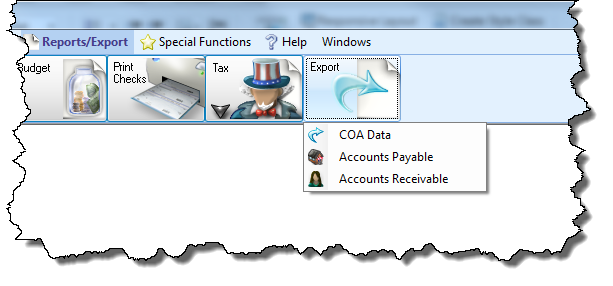
- From The Initial Portal of Church Windows choose Accounting
- Click Reports/Export in the Button Bar at the top of the screen.
- Click the Export button
- Choose Accounts Payable to save the list of Vendors / Payees
- Click Accounts Receivable to save the list of Clients
Note:
These Accounts Receivable exports will only be available to you if your organization has successfully registered the Licensing key that provides access to the Accounts Receivable portion of Church Windows Accounting.
 Accounts Payable
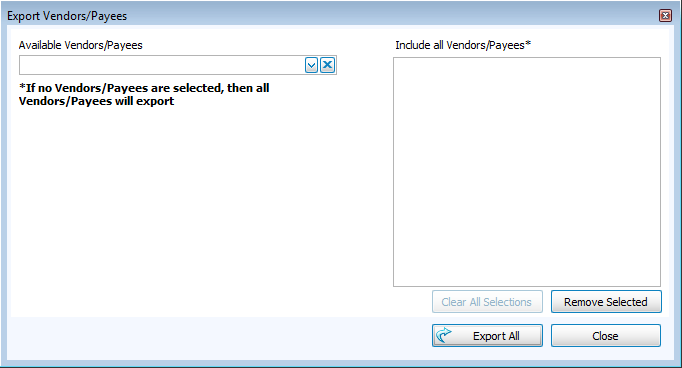
- If you would like to export the information for specific names, individually select them from the Available Vendors or Available A/R Clients dropdown list. Each selection you make will fill the list located to the right of the dropdown list.
- To individually remove names from the list, click the desired name and click the Remove Selected button.
- You can also click the Clear All Selections button to remove all names.
- If you wish to export every vendor, make sure that the list to the right of the Available Vendors dropdown list is blank and says Include all Vendors/Payees* at the top.
Accounts Receivable
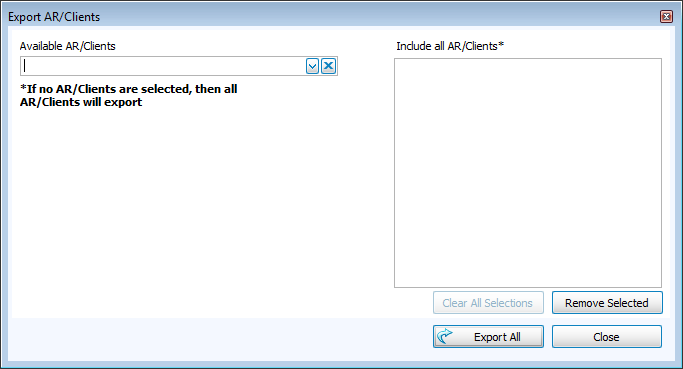
- If you would like to export the information for specific names, individually select them from the Available A/R Clients dropdown list. Each selection you make will fill the list located to the right of the dropdown list.
- To individually remove names from the list, click the desired name and click the Remove Selected button.
- You can also click the Clear All Selections button to remove all names.
- If you wish to export every A/R client, make sure that the list to the right of the Available A/R Clients dropdown list is blank and says Include all A/R Clients* at the top.
After making your selections for either export, click the Export Selected or Export All button to Export the information to a file and/or Send via Email.
